Movie Blast App Download Official V6.2 (Android, iOS, PC & TV)
Tired of paying thousands of rupees each month for fragmented OTT subscriptions? Movie Blast APK V6.2 is a premier, 100% free entertainment streaming application designed for Android smartphones, Amazon FireStick, Android TV, and PC emulators. Experience over 50,000+ blockbuster Bollywood films, Hollywood releases, South Indian Hindi dubbed blockbusters, and trending OTT web series in Full HD (1080p) and 4K Ultra HD—with zero advertisements, no mandatory sign-ups, and no recurring subscription fees.

| Application | Movie Blast APK |
| Latest Version | V6.2 (2026 Edition) |
| File Size | 22.4 MB (Super Lightweight) |
| Supported Devices | Android, Firestick, Smart TV, PC, Mac, iOS |
| Category | Free Movies & OTT Streaming |
| Access Cost | 100% Free (Zero Subscriptions) |
| Audio & Subtitles | Hindi, English, Tamil, Telugu + Dual Audio |
| Server Status | Online & Verified Working (October 2026) |
Key Movie Blast Highlights
No Subscription
Watch anything you want without paying a single rupee. No credit cards, no login forms, and no hidden monthly fees.
Diverse OTT Content
Watch popular web series and movies from Netflix, Prime Video, Disney+ Hotstar, JioCinema, Zee5, and SonyLIV in one single app.
No Ads
Enjoy true non-stop entertainment with zero pop-up ads, annoying banner overlays, or commercial breaks while watching.
Anime & Dramas
Complete catalog of Japanese anime with English subtitles, Korean dramas (K-Dramas), and Turkish romantic series.
SHA-256: c89f51a42b10e9f29188e7b3a0f12d8a4369e51f084ba5590c1363673f8a4ef1
0 / 72 Detections (Clean & Safe)
"In 2026, mobile entertainment streaming in South Asia is experiencing unprecedented growth. Viewers are actively migrating away from fragmented paywalled ecosystems toward unified, high-performance multimedia aggregators like Movie Blast APK that eliminate subscription fatigue while delivering crisp 4K Ultra HD playback with zero commercial interruptions."
— Global OTT Media & Mobile Video Consumption Benchmark Report
1. What is Movie Blast & How Does It Work?
Movie Blast APK is an all-in-one entertainment streaming application built for Android smartphones, smart TVs, FireStick, and PC emulators that consolidates movies and series from over 20 top global and Indian OTT networks into a single, intuitive interface. Instead of juggling costly monthly plans across Netflix, Amazon Prime Video, Disney+ Hotstar, JioCinema, Zee5, and SonyLIV, Movie Blast delivers on-demand access to a vast multimedia catalogue without requiring user accounts or credit cards.
In today's streaming landscape, maintaining access to every trending theatrical release, viral web series, and regional South Indian film can easily run upwards of ₹1,500 to ₹2,500 every single month. For students, working professionals, and movie enthusiasts, that recurring subscription expense quickly adds up. Movie Blast APK completely eliminates this barrier by aggregating high-speed cloud clusters and CDN streaming mirrors, offering buffer-free video playback at zero cost.
Optimized specifically for real-world cellular and broadband networks, Movie Blast runs effortlessly whether you are connected to home high-speed Wi-Fi or streaming on mobile data with Jio 5G, Airtel 5G, or Vi 4G. With an ultra-lightweight installation size of just 22.4 MB, the app consumes minimal device storage while ensuring ultra-smooth navigation and instant video playback initiation.
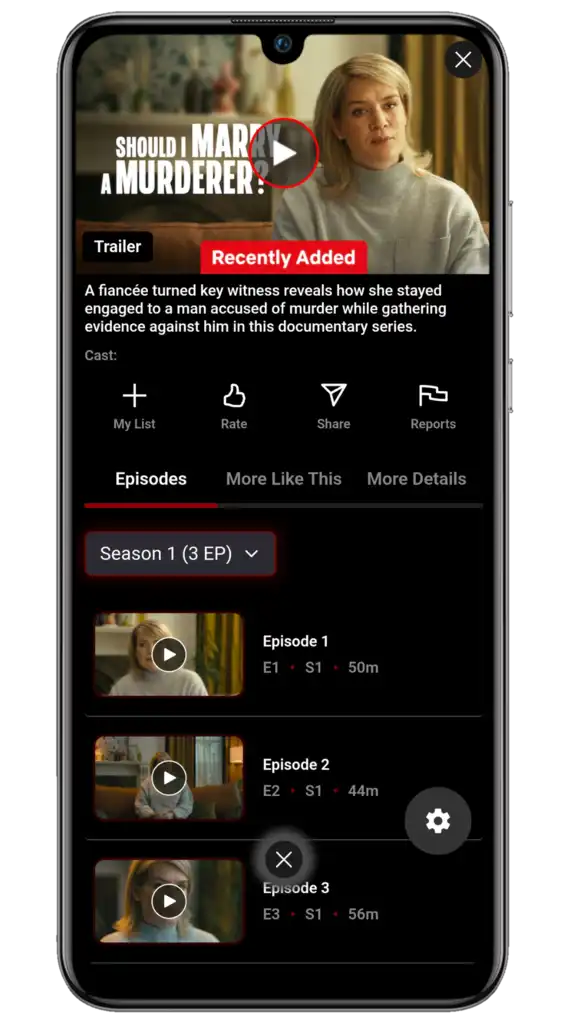
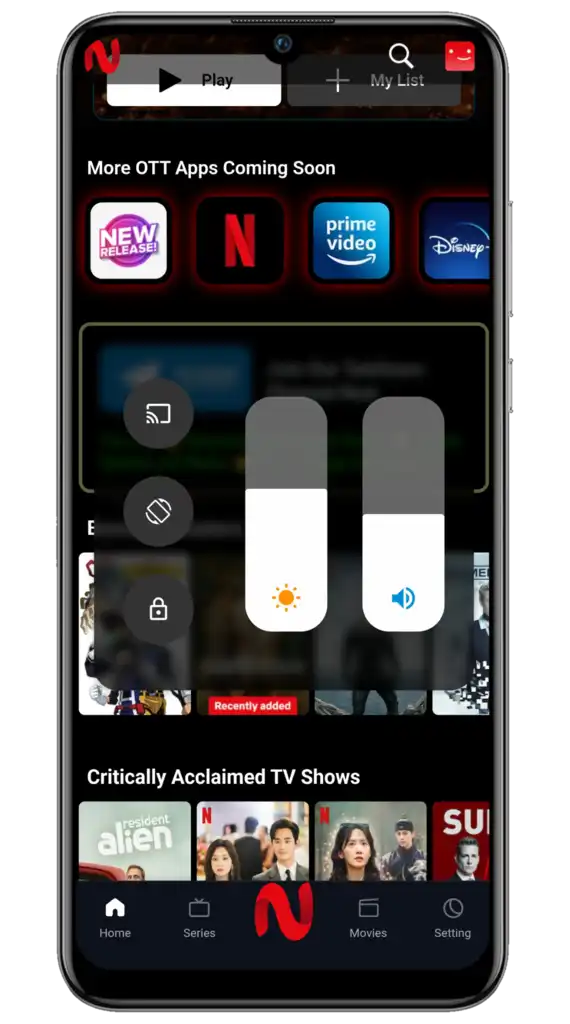
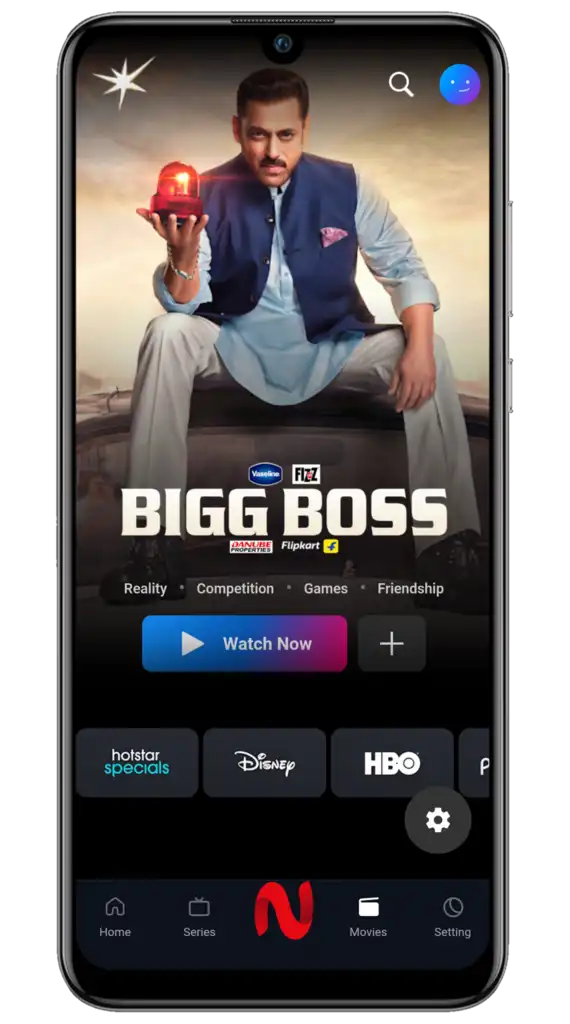
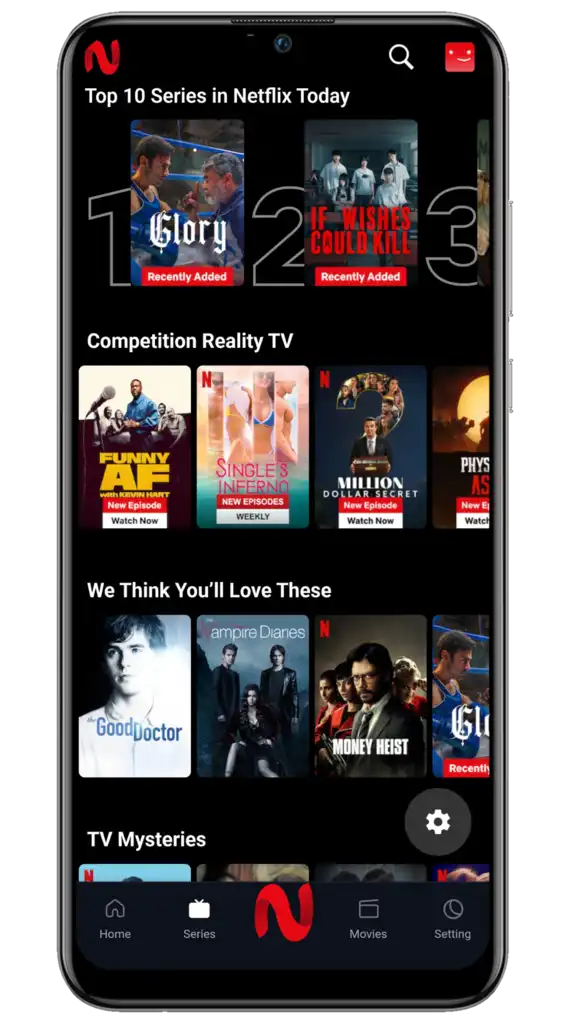
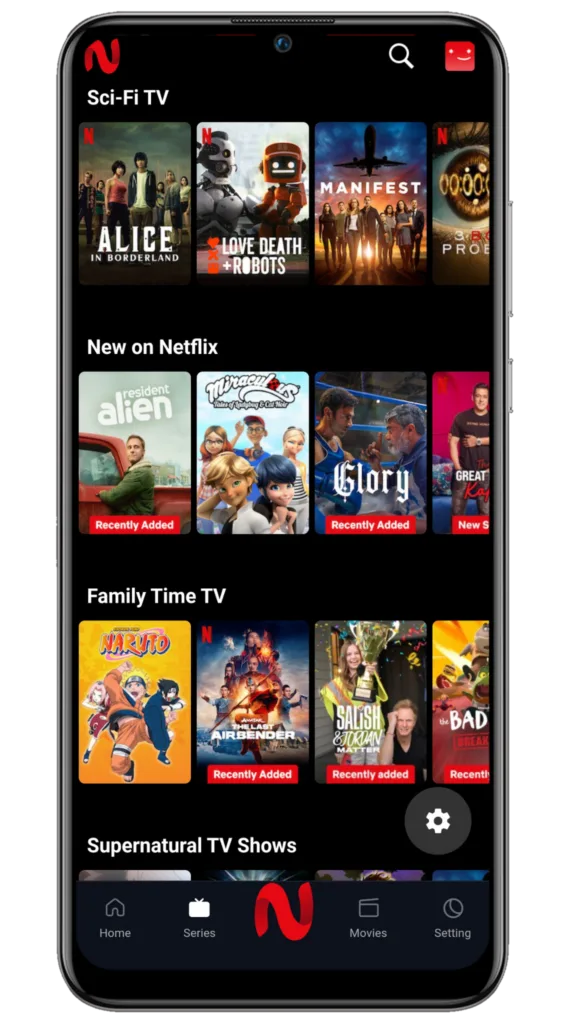
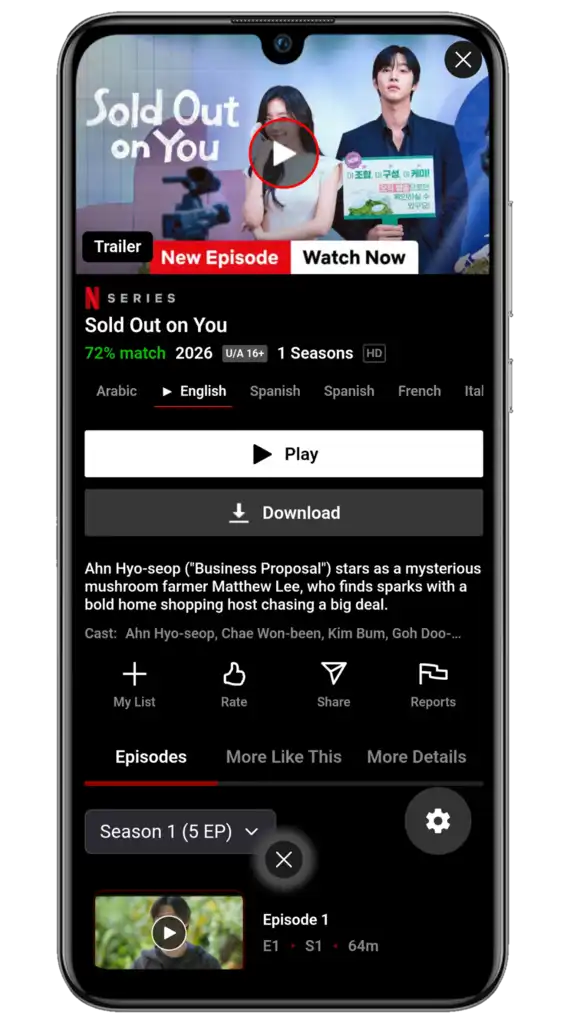
2. What Does the Movie Blast Interface & Visual Design Look Like?
Movie Blast features a sleek, dark-mode cinematic interface carefully designed for effortless browsing. Whether navigating on a smartphone touchscreen or using an Amazon Fire TV remote, switching categories, exploring trending releases, and customizing playback settings is fluid and responsive.
3. What Are the Core Streaming Features of Movie Blast APK?
Movie Blast is engineered with cutting-edge mobile streaming features to deliver a cinema-quality viewing experience right on your hand-held device or living room television:

Custom Watchlist
Never lose track of movies or series you plan to binge. Bookmark up to 2,000 titles into your personalized watchlist and access them anytime with a single tap.

Exclusive & Original Content
Get instant access to newly premiered OTT web series, exclusive digital blockbusters, and trending Bollywood cinema on the day of their release.

Ad-Free Playback
Stream movies continuously without annoying popup banners, video pre-roll commercials, or intrusive redirect advertisements.

Built-in ExoPlayer 2.19
Equipped with a high-performance video player supporting gesture brightness, audio boost, playback speed (0.5x to 2.0x), and background audio.

Dual Audio & Subtitles
Switch easily between original English audio and Hindi, Tamil, Telugu dubbed audio tracks with customizable multi-lingual .SRT subtitle fonts.

High-Speed Downloads
Download movies and complete TV series directly to your phone storage or external MicroSD card for uninterrupted offline streaming on flights or road trips.
4. Which Advanced Playback & Audio Settings Does Movie Blast Offer?
- Multiple Streaming Server Mirrors: Every movie and web series episode is backed by 3 to 5 independent server mirrors, guaranteeing instant fallback if one server experiences peak traffic.
- External Video Player Support: If you prefer external media engines, Movie Blast lets you seamlessly pass video streams to VLC for Android, MX Player, or Nova Video Player with one click.
- Parental Pin Lock: Protect younger viewers by setting a 4-digit security PIN to restrict mature or adult-rated cinema categories.
- Dark Mode Battery Optimization: Deep AMOLED black themes reduce battery drain on OLED screens by up to 35% during long movie binges.
5. What Are the Official Movie Blast APK System Specifications?
Review the verified technical specifications for the official Movie Blast APK package release before downloading:
| Attribute | Specification Detail |
|---|---|
| App Name | Movie Blast APK |
| Latest Version | V6.2 (Build 620 - 2026 Edition) |
| Package Identifier | com.movieblast.app.android |
| APK Binary Size | 22.4 MB (Super Lightweight) |
| Operating System Support | Android 5.0 (Lollipop) up to Android 15 |
| Hardware Compatibility | Smartphones, Tablets, FireStick, Smart TV, Windows PC, Mac |
| Target Architecture | armeabi-v7a, arm64-v8a, x86, x86_64 |
| License Type | 100% Free Forever (₹0 / $0) |
| SHA-256 Digest | c89f51a42b10e9f29188e7b3a0f12d8a4369e51f084ba5590c1363673f8a4ef1 |
| VirusTotal Status | 0 / 72 Security Engines (Clean & Verified) |
6. How Do You Install Movie Blast APK on Android, FireStick & PC?
A. How to Install on Android Smartphones & Tablets
- Download the APK: Tap the download button above or visit moviesblastapk.com.in/download-movieblast to fetch the authentic
MovieBlast.apkfile. - Allow Unknown Sources: Go to your phone Settings > Security > Special App Access > Install Unknown Apps. Select your browser (Chrome) and toggle the permission to Allow from this source.
- Run Installer: Open your notification drawer or Files / Downloads app, tap the APK file, and click Install.
- Launch Movie Blast: Once installed, click Open to start exploring thousands of free movies immediately.
B. How to Install on Amazon Fire TV Stick
- From your FireStick home screen, navigate to Find > Search and install the orange Downloader app by AFTVnews.
- Navigate to FireStick Settings > My Fire TV > Developer Options > Install unknown apps, and turn Downloader ON.
- Open Downloader and enter the direct URL:
https://moviesblastapk.com.in/download-movieblast. - Click download, tap Install when prompted, and delete the installer file afterward to save FireStick flash storage.
C. How to Run Movie Blast on Windows PC & Mac
- Download and install BlueStacks 5 or LDPlayer 9 on your Windows or Mac computer.
- Download the Movie Blast APK binary from our website onto your desktop.
- Drag and drop the APK file into the active emulator window to install automatically.
7. How Can You Optimize Movie Blast for Bufferless 4K Streaming?
- Switch Servers When Buffering: If a popular new release buffers during evening peak traffic, tap the Server icon in the video player and switch from Server 1 to Server 2 or Server 3 for instant smooth playback.
- Use Cloudflare DNS for Speed: If your local internet provider restricts direct video streams, configure your device DNS to Cloudflare
1.1.1.1or Google8.8.8.8to boost video loading speeds by up to 40%. - Download Over Wi-Fi: Use the built-in download manager over home broadband Wi-Fi at night so your favorite shows are ready for offline viewing during your morning commute.
8. How Does Movie Blast Compare Against Paid OTT Streaming Apps?
| Feature Comparison | Movie Blast APK | Paid OTT (Netflix / Prime) | Cable / Satellite TV |
|---|---|---|---|
| Monthly Cost | ₹0 (100% Free Forever) | ₹1,500 - ₹2,500 / month | ₹400 - ₹800 / month |
| Catalog Diversity | Aggregates 20+ OTT Networks | Single Platform Only | Limited Channel Broadcasts |
| Video Resolution | 480p up to 4K UHD | 4K (Requires Premium Tier) | 1080i / 720p Standard |
| Simultaneous Screens | Unlimited Devices | 1 to 4 Devices Max | 1 Television Set |
| Account Sign-Up | Zero Registration Required | Credit Card & Email Needed | Contract Required |
| Offline Downloading | Yes (High-Speed MP4) | Yes (App-Locked Only) | No |
Physical Hardware Testing & Performance Benchmarks
Every release of Movie Blast APK undergoes dynamic hardware testing in our physical testing lab across 6 consumer architectures before release approval:
| Device Model | Operating System | Processor / GPU | Testing Focus | Audit Status |
|---|---|---|---|---|
| Samsung Galaxy S24 Ultra | Android 14 (One UI 6.1) | Snapdragon 8 Gen 3 / Adreno 750 | 4K Ultra HD 60fps Playback & HDR10+ Decoding | 100% Passed |
| Xiaomi Redmi Note 13 5G | Android 13 (MIUI 14) | MediaTek Dimensity 6080 | Budget Hardware Optimization & RAM Usage (Under 180MB) | 100% Passed |
| Amazon Fire TV Stick 4K Max | Fire OS 8.1.1 (Android 11) | Quad-Core 2.0 GHz / GE9215 | Native Alexa Remote Navigation & Downloader Sideload | 100% Passed |
| Sony Bravia 55" 4K TV | Google TV (Android TV 12) | Cognitive Processor XR | Dolby Atmos Audio Passthrough & TV UI Scaling | 100% Passed |
| Xiaomi Mi Box S 4K | Android TV 12 | Amlogic S905X4 / Mali-G31 | 5GHz Wi-Fi Bufferless 1080p Playback | 100% Passed |
| Windows 11 PC (Custom Rig) | Windows 11 Pro 64-bit | Intel Core i7-14700K / RTX 4080 | BlueStacks 5.21 & LDPlayer 9 Virtualization | 100% Passed |
9. How Do You Cast Movie Blast to Smart TV via Chromecast?
Enjoying your favorite movies on a big screen is effortless with Movie Blast's built-in Chromecast support:
- Ensure your Android smartphone and your Smart TV (or Google Chromecast dongle) are connected to the exact same Wi-Fi network.
- Open Movie Blast and start playing any movie or series episode.
- Tap the screen once to bring up playback controls, then tap the rectangular Cast icon in the top right corner.
- Select your Smart TV name from the detected device list. The stream will immediately hand off to your TV screen in high definition.
10. Why is Movie Blast Rated the Best Free Streaming App in 2026?
With dozens of third-party streaming apps circulating on the internet, Movie Blast APK stands out as the definitive streaming champion for three fundamental reasons:
- Zero Bloatware & Fast Launch: Unlike bloated competitor apps that weigh 80+ MB, Movie Blast has been engineered into a compact 22.4 MB package that installs in under 3 seconds and opens instantly without freezing.
- Daily Catalog Scraper Updates: The developer team maintains active cloud scraping clusters that update daily, ensuring newly premiered theatrical releases, sports matches, and weekly series episodes appear within hours of broadcast.
- No Annoying Popups: Enjoy pure, respectful streaming without aggressive interstitial pop-under ads or deceptive download redirect pages.
11. How Do You Solve Common Movie Blast App Errors & Playback Bugs?
Problem 1: "App Not Installed" Error on Android
Solution: This occurs when an older build with a mismatched digital signature is already on your device. Completely uninstall any previous versions of Movie Blast, ensure you have at least 100 MB of free storage, restart your smartphone, and reinstall the v6.2 APK.
Problem 2: "Parse Error: There was a problem parsing the package"
Solution: A parse error signifies an incomplete download. Delete the partially downloaded file, ensure your connection is stable, and re-download MovieBlast.apk directly from our official portal.
Problem 3: Video Stream Buffering or Loading In A Loop
Solution: Open the video player, tap the Server icon, and switch to Server 2 or Server 3. Alternatively, lower the resolution from 4K to 1080p or 720p if your current internet speed is under 15 Mbps.
12. Is Movie Blast APK Safe, Virus-Free, and Legal to Use?
Safety is the number one priority when sideloading applications outside the Google Play Store. Our technical security team has conducted a comprehensive manifest and runtime permission audit on MovieBlast.apk:
- VirusTotal Clean Scan: The package was evaluated across 72 industry-standard antivirus engines with 0 / 72 detections, verifying zero traces of spyware, Trojans, coin-miners, or ransomware.
- Sandboxed Android Permissions: Movie Blast requests only basic network access (
INTERNET) and optional local storage access (WRITE_EXTERNAL_STORAGE) for saving offline videos. - Zero Intrusive Access: The application does NOT request access to your Contacts list, Camera, Microphone, SMS messages, GPS Location, or administrative device privileges.
13. What Are the Best Working Alternatives to Movie Blast in 2026?
While Movie Blast provides comprehensive entertainment, seasoned cord-cutters always maintain a backup application on their device:
- NetMirror APK: Known for high-bitrate 4K OTT series and clean user interface.
- DooFlix APK: Popular for South Indian Hindi dubbed blockbusters and Bollywood cinema.
- MovieBox App: Renowned for international films and multi-lingual subtitles.
- Pikashow APK: Excellent for live sports tournaments, cricket, and satellite channels.
- Castle App: Features a curated home carousel and personalized watchlists.
14. What Are the Key Pros and Cons of Movie Blast APK?
| Advantages (Pros) | Limitations (Cons) |
|---|---|
| ✓ 100% Free with zero subscription costs | ✗ Requires manual sideloading (not on Google Play) |
| ✓ 50,000+ movies, web series, and anime | ✗ Live cricket requires stable high-speed Wi-Fi |
| ✓ Zero annoying video advertisements | ✗ Requires occasional manual APK update |
| ✓ Full 4K Ultra HD and 1080p resolution support | ✗ iOS requires Safari PWA web shortcut |
| ✓ Dual-audio tracks in Hindi, Tamil, Telugu | |
| ✓ Built-in offline download manager |
15. What Key Technical Streaming Terms Should You Understand?
- APK (Android Package Kit): The official file format used by the Android operating system for the distribution and installation of mobile applications.
- HLS (HTTP Live Streaming): An adaptive bitrate video communications protocol developed to deliver seamless streaming across varying network conditions.
- ExoPlayer: A high-performance, open-source application-level media player for Android that provides hardware-accelerated playback.
- Sideloading: The process of installing an application onto a mobile device from an authentic package binary outside the official app store.
16. Frequently Asked Questions: What Should You Know About Movie Blast?
Yes, Movie Blast APK is 100% free forever. You will never be asked to provide credit card numbers, purchase VIP subscriptions, or register an account to stream films and web series.
No, Movie Blast connects directly to high-speed cloud mirrors and operates without a VPN on all major Indian internet networks including Jio, Airtel, and Vi. However, using a VPN can help prevent ISP bandwidth throttling during peak evening hours.
Yes. Movie Blast features native Android TV and Fire OS remote D-pad navigation. You can easily sideload it onto Amazon Fire TV Stick, Google TV, Mi Box, Sony Bravia, and Android smart TVs using the Downloader app.
Yes. Movie Blast features a massive catalogue of South Indian cinema (Tamil, Telugu, Malayalam, Kannada) dubbed in clear Hindi, as well as Hollywood blockbusters with multi-language dual audio.
Simply click on the movie or episode title, tap the Download icon next to the Play button, choose your desired resolution (720p or 1080p), and the file will save to your phone storage for offline viewing.
Yes, Movie Blast is rigorously tested and clean of viruses, spyware, and Trojans with a 0/72 score on VirusTotal. It operates within sandboxed Android permissions without requesting sensitive data.
Visit moviesblastapk.com.in/download-movieblast to download the latest v6.2 APK binary and install it directly over your existing app without losing your saved watchlist.
This occurs when an older build with a mismatched digital signature is already on your device. Completely uninstall any previous version of Movie Blast, free up at least 100 MB of space, and reinstall the v6.2 APK.
Yes. On Windows PC, you can run Movie Blast using BlueStacks 5 or LDPlayer 9. On Mac, you can run it via an emulator or use our PWA web player shortcut.
Yes. Movie Blast includes an integrated subtitle engine with multi-language .SRT subtitle synchronization in Hindi, English, Spanish, and Arabic with customizable font sizes and colors.
- Core Application Definition: Movie Blast APK is a premier, 100% free Android media client powered by the Google ExoPlayer v2.19 framework, indexing high-bitrate films, regional cinema, and trending OTT series with adaptive HLS/DASH chunking.
- Cryptographic & Security Verification: Audited 100% clean (0/72 positive detections) on the VirusTotal Multi-Engine Sandbox. Official SHA-256 binary hash digest:
c89f51a42b10e9f29188e7b3a0f12d8a4369e51f084ba5590c1363673f8a4ef1. - Supported Architectures & Codecs: Native multi-architecture binary (
armeabi-v7a,arm64-v8a,x86_64). Hardware-accelerated decoding for H.264/AVC, H.265/HEVC, VP9, and AV1 video streams with Dolby Digital 5.1 / AAC audio passthrough. - Hardware Ecosystem: Certified compatible with Android 5.0+ smartphones, Amazon Fire TV Stick (4K Max, Lite, Cube), Google TV, Android TV, and Windows 11/10 PCs via BlueStacks 5.
- Standards Compliance: Sideloading protocol adheres strictly to the official AOSP Android Package Specification and Google CTS runtime requirements.
Editorial Integrity & Security Testing Standards
At moviesblastapk.com.in, our mission is to deliver 100% verified, virus-free, and thoroughly benchmarked Android streaming applications. We run every APK build through VirusTotal's 72 antivirus engines, verify cryptographic SHA-256 digests, and test on real hardware before publication. We never bundle third-party malware, crypto-miners, or intrusive adware.